
Al fin, hubo el chance de probar el nuevo crawler en el terreno para el que fué creado. Luego de un upgrade de motor, fuimos con los amigos crawleros a trepar piedras. Les dejo un videíto de la acción de la tarde.
[HTML1]
18f4550 328 adc arduino arm avion bici china code cortex cuenca debian ecuador Electrónica energia facebook fpv gobierno launchpad lcd led linux onboard patolin pi ppm Programacion quad radiocontrol raspberry rc robot robótica servos shield stellaris stewart timer tmart transmisor twitter uno USB video wordpress
Al fin, hubo el chance de probar el nuevo crawler en el terreno para el que fué creado. Luego de un upgrade de motor, fuimos con los amigos crawleros a trepar piedras. Les dejo un videíto de la acción de la tarde.
[HTML1]
Luego de que nos quedamos un poco confundido con este video de electrónica troll, al fin el autor nos presenta la respuesta.
En realidad el circuito tiene 2 fuentes de AC dentro de la batería (vaya pulso!) y se colocaron diodos e inductores dentro de los leds. Les dejo el video para que descubran el secreto
[HTML1]
A pesar de que ya fué retrasada la votación de esta conflictiva ley, les dejo una explicativa (y divertida) animación que nos ilustra de lo que puede pasar si la aprueban.
Realizada por The Oatmeal, y aunque no lo crean (ni su mismo autor lo cree) fué publicitada por CNN, y resultó un trending topic en twitter el día del blackout de protesta contra SOPA…..
Diviertanse un rato y que tengan un buen fin de semana.

El día de mañana, miércoles 18 de enero, muchos sitios importantes de internet, entrarán en una «huelga» en protesta contra la ley SOPA y PIPA que se han propuesto en Estados Unidos.
Entre los sitios que entran en esta protesta (además de www.patolin.com) tenemos los siguientes:
Desde hace algunas semanas, han tomado fuerza los comentarios y acciones de oposición en contra de ley «S.O.P.A.» que se pretende promulgar en los Estados Unidos. Pero que incluye esta ley, y en que nos afecta? Trataré de escribir un pequeño artículo explicando la situación.

Antes de nada, vamos a analizar un pequeño mal, con el que vivimos a diario: La Piratería. La adoramos, y la odiamos. La adoramos porque podemos conseguir todo el software, películas y música prácticamente gratis (seamos sinceros, todos todos todos acá hemos comprado peliculas piratas, bajado música gratis del internet, y cargado un keygen pirata del office 2007, porque ha caducado el que vino en nuestra laptop nueva), pero también la odiamos, porque como desarrolladores, prácticamente no tenemos ninguna protección de nuestras creaciones, y los gringos la odian aún más, porque les representa millones de dolares en pérdidas.
Como paréntesis, les comento un caso que me pasó. Hace algún tiempo, diseñé un pequeño programa para manejar un parqueadero, que fué solicitado por encargo para una empresa X, y cual fué mi sorpresa? que luego de un año, me entregaban tickets de parqueo, impresos por mi aplicación, en varios parqueaderos de la ciudad…… lo que me queda la duda es si revendieron el programa o si lo dieron gratis; si fuera el segundo caso, estaría mas tranquilo.
Esto por ponerles solo un caso, pero cuanta gente (programadores, diseñadores, músicos) se han visto mellados por la piratería, (recuerdan la película Suquillo Express? que quebró antes de que puedan parar las copias piratas que ya circulaban en la calle antes de su estreno) haciendo super complicado surgir con ideas propias, ya que todo el trabajo realizado, se vende por $1 o $2 si se copia en dvd.
Pero bueno, esto pasa acá en Ecuador, y volviendo al tema de la PIPA (no la de fumar) y la SOPA (no la de tomar en el almuerzo), tenemos que ubicarnos en el gran país del norte, Estados Unidos, donde la mayoría de las empresas de tecnología se encuentran ubicadas.
PIPA son las siglas de Protect IP Act, es decir el Acto de Protección IP, y esta ley fué introducida en el Senado Americano el 12 de mayo del 2011. Esta ley, lo que intenta, es tomar acciones legales contra sitios web (ya sea que se encuentren en EEUU o fuera) que infrinjan sus leyes de propiedad intelectual. Si se aprueba, el gobierno podría hacer lo siguiente:
SOPA es un acrónimo par Stop Online Piracy Act (Acto para Detener la Piratería en Línea), y fué introducida el 26 de octubre de 2011, y no es más que una lista negra de sitios que promueven la piratería. Al igual que la PIPA, la SOPA trae algunas consecuencias para sus infractores, entre las que tenemos:
Desde www.thatexplainsalot.com, les comparto un interesante artículo acerca de la optimización de wordpress, que cubre desde mejoras en el cache del navegador y del servidor, hasta algunos trucos para mejorar el rendimiento del MySql. Se los recomiendo.
If you ever experienced slow WordPress admin panel, “MySQL server has gone away” message, pages taking forever to load or you want to prepare your site for a major increase in traffic (for example Digg front page) this is the guide for you.
Most commonly the problem with slow loading sites is just the sheer size of the page. A typical webpage today will be loaded with images, flash, videos and javascripts all which take a significant portion of bandwidth.
If you want to start dealing with this issue seriously you need to get Firefox browser, Firebug extension and Yslow plugin.
Yslow module will allow you to get a performance score from 0-100. Getting your site to 80+ score should be your aim.
Try to keep your page size under 100KB. Try to keep it under 50kb if possible. If you have a lot of multimedia content then by all means learn to use YSlow.
Learn about ways to improve the page loading speed.
Another useful Firefox extension worth checking out is Google’s Page Speed.
In rare occasions when you are loading your and other sites slowly, it can be your Vista system that is causing the slowdown.
If you are running Vista check this article for a diagnosis and a possible solution.
Plugins are usually the prime suspect for slowdowns. With so many WordPress plugins around, chance is you might have installed a plugin which does not use the resources in an optimum way.
For example such plugins that caused slowdowns in the past have been Popularity contest, aLinks or @Feed.
To check plugins, deactivate all of them and check the critical areas of the site again. If everything runs OK, re-enable the plugins one by one until you find the problematic plugin.
After finding the cause you can either write a message to the plugin author and hope they fix it or search for an alternative.
If it’s not the plugins, and you are troubleshooting slowdown of the site, you should check it with a different theme.
Themes can include code with plugin capabilities inside the theme’s function.php file so everything what applies to plugins can apply to the theme.
Also, themes may use excessive JavaScript or image files, causing slow loading of the page because of huge amount of data to transfer and/or number of http requests used.
WordPress comes installed with a default theme and it’s best used to test the site if your theme is the suspect for poor performance.
If you discover your theme is causing the slowdowns, you can use the excellent Firebug tool for Firefox browser to debug the problem. Learn more about Firebug, your new best friend.
You can also use this site get general information about the site very fast.
Database tables should be periodically optimized (and repaired if necessary) for optimum performance.
I recommend using WP-DBManager plugin which provides this functionality as well as database backup, all crucial for any blog installation.
WP-DBManager allows you to schedule and forget, and it will take care of all the work automatically.
Other alternative is manually optimizing and repairing your table through a tool like phpmyadmin.
With WordPress 2.6, post version tracking mechanism was introduced. For example, every time you “Save” a post, a revision is written to the database. If you do not need this feature you can easily turn it off by adding one line to your wp-config.php file, found in the installation directory of your WordPress site:
define(‘WP_POST_REVISIONS’, false);
If you have run a blog with revisions turned on for a while, chance is you will have a lot of revision posts in your database. if you wish to remove them for good, simply run this query (for example using the mentioned WP-DBManager) plugin.
DELETE FROM wp_posts WHERE post_type = “revision”;
This will remove all “revision” posts from your database, making it smaller in the process.
NOTE: Do this with care. If you are not sure what you are doing, make sure to at least create a backup of the database first or even better, ask a professional to help you.
Caching is a method of retrieving data from a ready storage (cache) instead of using resources to generate it every time the same information is needed. Using cache is much faster way to retrieve information and is generally recommended practice for most modern applications.
The easiest way to implement caching (and usually the only way if your blog is on shared hosting) is to use a caching plugin.
The most commonly used is WP Super Cache.
A new kid on the block, W3 Total Cache is more powerful alternative, maturing with every day.
MySQL can save the results of a query in it’s own cache. To enable it edit the MySQL configuration file (usually /etc/my.cnf) and add these lines:
query_cache_type = 1
query_cache_limit = 1M
query_cache_size = 16M
This will create a 16 MB query cache after you restart the MySQL server (the amount depends on the amount of available RAM, I use around 250MB on 4GB machine).
To check if it is properly running, run this query:
SHOW STATUS LIKE ‘Qcache%’;
Example result:
Qcache_free_blocks 718 Qcache_free_memory 13004008 Qcache_hits 780759 Qcache_inserts 56292 Qcache_lowmem_prunes 0 Qcache_not_cached 3711 Qcache_queries_in_cache 1715 Qcache_total_blocks 4344
There a lot of options you can play with so here is my MySQL config file instead, tuned in for 4GB, quad-core dedicated machine. This will most probably not work for your machine out of box, use it just as a general guideline.
[mysqld]
bulk_insert_buffer_size = 8M
connect_timeout=10
interactive_timeout=50
join_buffer=1M
key_buffer=250M
max_allowed_packet=16M
max_connect_errors=10
max_connections=100
max_heap_table_size = 32M
myisam_sort_buffer_size=96M
query_cache_limit = 4M
query_cache_size = 250M
query_cache_type = 1
query_prealloc_size = 65K
query_alloc_block_size = 128K
read_buffer_size=1M
read_rnd_buffer_size=768K
record_buffer=1M
safe-show-database
skip-innodb
skip-locking
skip-networking
sort_buffer=1M
table_cache=4096
thread_cache_size=1024
thread_concurrency=8
tmp_table_size = 32M
wait_timeout=500# for slow queries, comment when not used
#log-slow-queries=/var/log/mysql-slow.log
#long_query_time=1
#log-queries-not-using-indexes[mysqld_safe]
nice = -5
open_files_limit = 8192[mysqldump]
quick
max_allowed_packet = 16M[myisamchk]
key_buffer = 64M
sort_buffer = 64M
read_buffer = 16M
write_buffer = 16M
Tip #2:
Here is a further read regarding MySQL optimization and another one here.
Extremely useful mysqlrepot tool will help you tweak that mysql like nothing. Mysql tuner is one of the best and quickest tools out there to tell you how can you fix up your database. MySQL Tuning primer and MySQL Activity Report are another two scripts to try out.
Maatkit is an extremely useful toolkit for managing MySQL.
MySQL slow query log is valuable for getting info about most problematic queries. To activate it you can edit your my.cnf
log-slow-queries=/var/log/mysql-slow.log
long_query_time=1
log-queries-not-using-indexes
This will create a log of slow queries and those not using indexes. Now you need to be able to identify the slow ones for which you can use external slow log filter and parsing tools. Using ‘EXPLAIN‘ is an effective way to understand and optimize complex queries.
You can also install mytop, a ‘top’ command clone that works with MySQL.
PHP is interpreted language, meaning that every time PHP code is started, it is compiled into the so called op-codes, which are then run by the system. This compilation process can be cached by installing an opcode cache such as eAccelerator. There are other caching solutions out there as well.
To install eAccelerator, unpack the archive and go to the eAccelerator folder. Then type:
phpize
./configure
make
make install
This will install eAccelerrator.
Next create temp folder for storage:
mkdir /var/cache/eaccelerator
chmod 0777 /var/cache/eaccelerator
Finally to enable it, add these lines to the end of your php.ini file (usually /etc/php.ini or /usr/lib/php.ini):
extension=”eaccelerator.so”
eaccelerator.shm_size=”16?
eaccelerator.cache_dir=”/var/cache/eaccelerator”
eaccelerator.enable=”1?
eaccelerator.optimizer=”1?
eaccelerator.check_mtime=”1?
eaccelerator.debug=”0?
eaccelerator.filter=”»
eaccelerator.shm_max=”0?
eaccelerator.shm_ttl=”0?
eaccelerator.shm_prune_period=”0?
eaccelerator.shm_only=”0?
eaccelerator.compress=”1?
eaccelerator.compress_level=”9?
The changes will be noticeable at once, as PHP does not need to be ‘restarted’.
Note #1: WP Super Cache and eAccelerator work fine together showing further increase in performance.
Note #2: If you like even more possibility for performance, check the WP Super Cache and eAccelerator plugin.
Note #3: Unfortunately eAccelerator won’t work if PHP is run as CGI. You can try using fastcgi which will work with suExec and eAccelerator.
Note #4:W3 Total Cache mentioned earlier already utilities both memcached and APC making it amazingly fast.
Apache optimization is something books have been written on so I will first forward you to this article here. Indepth apache compilation tips here, performance tuning here, VPS tips here and keep alive tips here.
You can easily test changes in your configuration by running a test from your command prompt
ab -t30 -c5 http://www.mysite.com/
and comparing results. I get around 200 req/s on VPS server.
For more flexible testing you can use Autobench which works in conjunction with httperf, another benchmarking tool.
Use a fast web server like nginx to serve static content (ie. images) while passing dynamic requests is another popular technique you can use to improve performance.
Note #1: More cool resources. Optimizing Page load time and a great series on website performance.
Note #2: You can find even more tips&tricks on Elliot Back’s site
This WordPress database error appears on certain configurations and it manifests in very slow and no response, usually on your admin pages.
Workaround for this MySQL problem has been best addressed in this article.
This problem evidently exists, but the suggested fix is valid only until you upgrade your WordPress. Hopefully it will be further researched and added into the WordPress core in the future.
Note #1: Sometimes increasing MySQL wait_timeout to 1000 will help with this issue.
If you experience WordPress admin panel crawling to a halt, with inability to post or update certain posts, you are probably hitting the mod_security wall.
ModSecurity is Apache module for increasing web site security by preventing system intrusions. However, sometimes it may decide that your perfectly normal WordPress MySQL query is trying to do something suspicious and black list it, which manifests in very slow or no response of the site.
To test if this is the case, check your Apache error log, for example:
tail -f /usr/local/apache/logs/error_log
and look for something like this:
ModSecurity: Access denied with code 500 (phase 2) … [id «300013»] [rev «1»] [msg «Generic SQL injection protection«] [severity «CRITICAL»] [hostname www.prelovac.com»] [uri “/vladimir/wp-admin/page.php”
It tells you the access for this page was denied because of a security rule with id 300013. Fixing this includes white-listing this rule for the page in question.
To do that, edit apache config file (for example /usr/local/apache/conf/modsec2/exclude.conf) and add these lines:
SecRuleRemoveById 300013
This will white list the page for the given security rule and your site will continue to work normally.
Reasons for slow WordPress posting may include rss ping and pingback timeouts.
By default WordPress will try to ping servers listed in your ping list (found in Settings->Writing panel) and one of them may timeout slowing the entire process.
Second reason are post pingbacks, mechanism in which WordPress notifies the sites you linked to in your article. You can disable pingbacks in Settings->Discussion by un-checking option “Attempt to notify any blogs linked to from the article (slows down posting)“.
Try clearing ping list and disabling pingbacks to see if that helps speed up your posting time.
Most browsers are set to load 2-4 files from a domain in parallel. If you move some files to a different domain (subdomain will work) the browser will start downloading 2-4 more files in parallel.
It is good idea to move your theme image files to a subdomain you create. I have created demo.prelovac.com/images and moved my theme images there. I have then changed the theme style.css to reflect the full url to the new image files. Job done!
You can lower the number of HTTP requests by using fewer images (or placing all images in one large image and position them with CSS), fewer javascripts, fewer css files (usually meaning fewer plugins).
Good effort has been made by PHP speedy plugin which will merge all your JavaScript and all CSS files in one big file which really helps in lowering the HTTP request numbers. The biggest drawback of PHP Speedy is that it’s not 100% compatible with all plugins.
Also use the CSS Sprite generator to move all your images into one image and then use CSS background-position to display them. This will cut your number of HTTP requests significantly.
If you have our own server you can chose to gzip all content sent to browsers. This will lower the loading time significantly as most html pages compress very well.
Add this code to your .htaccess
AddOutputFilterByType DEFLATE text/html text/plain text/xml text/css application/javascript application/x-javascript application/x-httpd-php application/rss+xml application/atom_xml text/javascript
Expire headers tell the browser how long it should keep the content in cache. Most of the images on your site never change and it is good idea to keep them cached locally.
Add this to your .htaccess (make sure mod_expires is loaded in your apache if you have problems)
<FilesMatch "\.(ico|jpg|jpeg|png|gif|js|css|swf)$">
ExpiresActive on
ExpiresDefault "access plus 30 days"
Header unset ETag
FileETag None
</FilesMatch>
Here is an alternative setting:
Header unset Pragma
FileETag None
Header unset ETag

# 1 YEAR

Header set Cache-Control "public"
Header set Expires "Thu, 15 Apr 2010 20:00:00 GMT"
Header unset Last-Modified

# 2 HOURS

Header set Cache-Control "max-age=7200, must-revalidate"

# CACHED FOREVER
# MOD_REWRITE TO RENAME EVERY CHANGE

Header set Cache-Control "public"
Header set Expires "Thu, 15 Apr 2010 20:00:00 GMT"
Header unset Last-Modified
Use cacheability engine to check your cache configuration.
Many blogs use Gravatars, the little images next to your comments. However gravatars have two big flaws in regards to site optimization:
What we can do is create a local gravatar cache, where images would be cached and served from our site. Ideally you would place the gravatar cache on a separate subdomain (see first heading).
I use a plugin from Zenpax.com which allows all gravatars to be cached locally.
It is often overlooked that your images can be optimized (made smaller) which can significantly reduce loading times.
Wouldn’t it be perfect if you could open a site, press a button in your browser and get all images on the site optimized and made available in a single zip file. That is possible thanks to smush.it and their Firefox plugin. It is amazing how effective this is!
It is golden practice to put CSS files on top of the page so they are loaded first. JavaScript files should be placed on the bottom of the page (when possible). I have created a simple plugin which will move the properly registered JavaScript files to the bottom of your pages. The plugin is called Footer javaScript.
Modern webservers and websites have grown to depend on many different factors.
This article covered various approaches to optimization from system level apache, PHP and MySQL changes to settings within your WordPress.
I hope following this guide will help you create a fast and responsive WordPress based site.
Si has seguido el paso de jQuery por la internet, sabrás que cada día facilita más la creación de aplicaciones web mucho mas prácticas y fáciles de programar. Les dejo un recopilatorio de snippets de jquery, desde www.catswhocode.com.
Preloading images is useful: Instead of loading an image when the user request it, we preload them in the background so they are ready to be displayed. Doing so in jQuery is very simple, as shown below:
(function($) {
  var cache = [];
  // Arguments are image paths relative to the current page.
  $.preLoadImages = function() {
    var args_len = arguments.length;
    for (var i = args_len; i--;) {
      var cacheImage = document.createElement('img');
      cacheImage.src = arguments[i];
      cache.push(cacheImage);
    }
  }

jQuery.preLoadImages("image1.gif", "/path/to/image2.png");
Source: http://engineeredweb.com/blog/09/12/preloading-images-jquery-and-javascript
The following snippet will open all links with the rel="external" attribute in a new tab/window. The code can be easily customized to only open links with a specific class.
$('a[@rel$='external']').click(function(){
     this.target = "_blank";
});

/*
   Usage:
   <a href="http://www.catswhocode.com" rel="external">catswhocode.com</a>
*/
Source: http://snipplr.com/view/315/-jquery–target-blank-links/
This snippet is just a line of code, but it is one of the easiest way to detect if JavaScript is enabled on the client browser. If yes, a hasJS class will be added to the <body> tag.
$('body').addClass('hasJS');
Source: http://eisabainyo.net/weblog/2010/09/01/10-useful-jquery-snippets/
jQuery is known for its ability to let developers easily create stunning visual effects. A simple, but nice effect is smooth sliding to an anchor. The following snippet will create a smooth sliding effect when a link with the topLinkclass is clicked.
$(document).ready(function() {
	$("a.topLink").click(function() {
		$("html, body").animate({
			scrollTop: $($(this).attr("href")).offset().top + "px"
		}, {
			duration: 500,
			easing: "swing"
		});
		return false;
	});
});
Source: http://snipplr.com/view.php?codeview&id=26739
Another very cool effect – which is very popular among clients – is indeed the fade in/fade out on mouseover. The code below set opacity to 100% on hover, and to 60% on mouseout.
$(document).ready(function(){
    $(".thumbs img").fadeTo("slow", 0.6); // This sets the opacity of the thumbs to fade down to 60% when the page loads

    $(".thumbs img").hover(function(){
        $(this).fadeTo("slow", 1.0); // This should set the opacity to 100% on hover
    },function(){
        $(this).fadeTo("slow", 0.6); // This should set the opacity back to 60% on mouseout
    });
});
Source: http://snipplr.com/view/18606/
When building a column based website, you often want that all columns have the same height, as displayed in a good old table. This snippet calculate the height of the higher column and automatically adjust all other columns to this height.
var max_height = 0;
$("div.col").each(function(){
    if ($(this).height() > max_height) { max_height = $(this).height(); }
});
$("div.col").height(max_height);
Source: http://web.enavu.com/tutorials/top-10-jquery-snippets-including-jquery-1-4/
HTML5 is definitely the future of client-side web development. Unfortunely, some old browsers do not even recognize new tags such as header or section. This code will force old browsers to recognize the new tags introduced by HTML5.
(function(){if(!/*@cc_on!@*/0)return;var e = "abbr,article,aside,audio,bb,canvas,datagrid,datalist,details,dialog,eventsource,figure,footer,header,hgroup,mark,menu,meter,nav,output,progress,section,time,video".split(','),i=e.length;while(i--){document.createElement(e[i])}})()
A better solution is to link the .js file to the <head> part of your HTML page:
<!--[if lt IE 9]>
<script src="http://html5shim.googlecode.com/svn/trunk/html5.js"></script>
<![endif]-->
Source: http://remysharp.com/2009/01/07/html5-enabling-script/
Here is a simple jQuery function to check if the client browser supports a specific CSS3 property. In this example,border-radius is the property we want to check, but of course this can be modified easily.
Note that when passing the property, you have to omit the dash to prevent syntax error. So instead of border-radius, you have to pass “borderRadius” or “BorderRadius”.
var supports = (function() {
   var div = document.createElement('div'),
      vendors = 'Khtml Ms O Moz Webkit'.split(' '),
      len = vendors.length;

   return function(prop) {
      if ( prop in div.style ) return true;

      prop = prop.replace(/^[a-z]/, function(val) {
         return val.toUpperCase();
      });

      while(len--) {
         if ( vendors[len] + prop in div.style ) {
            // browser supports box-shadow. Do what you need.
            // Or use a bang (!) to test if the browser doesn't.
            return true;
         }
      }
      return false;
   };
})();

if ( supports('textShadow') ) {
   document.documentElement.className += ' textShadow';
Source: http://snipplr.com/view/44079
Getting url parameters is pretty easy using jQuery. The following snippet will do the job!
$.urlParam = function(name){
	var results = new RegExp('[\\?&]' + name + '=([^&#]*)').exec(window.location.href);
	if (!results) { return 0; }
	return results[1] || 0;
}
Source: http://snipplr.com/view/26662
By default, a form can be submitted by pressing the “Enter” key. Thought, on some form, this keyboard shortcut can cause problems. Here is how you can prevent unwanted form submission by disabling the “Enter” key with jQuery.
$("#form").keypress(function(e) {
  if (e.which == 13) {
    return false;
  }
});
Source: http://snipplr.com/view/10943/disable-enter-via-jquery/
Este último tiempo, hemos visto grandes avances en los equipos embebidos, que contienen grandes funcionalidades en empaques cada vez más pequeños.
Cada vez vemos y tenemos a nuestra disposición microcontroladores más y más poderosos. En nuestras épocas de estudiantes, ni nos imaginabamos realizar una transformada FFT en un micro, o conectarlo a un computador via USB o ethernet! esas eran utopías en aquellas épocas del 8051, pero ahora con los nuevos micros de la marca Microchip, y los Arduinos, la cosa se va haciendo cada vez más sencilla, en cuando a proyectos de electrónica se refiere .
Pero mirando un poco más allá (y con la ayuda de la producción en masa), encontramos un producto más elaborado. El esperado Raspberry Pi, que tiene memoria ram y almacenamiento suficiente, para cargar una distribución de linux completa (incluida la interfaz gráfica). A esto súmale puertos USB, conexión ethernet de 100Mbps, audio y salida RCA para TV, y tendrás un computador de escritorio, que podría funcionar tranquilamente como un terminal de navegación de internet, o para escribir uno que otro texto. Imagínate el primer Pentium 4 que tuviste (de esos de 1Ghz de velocidad), pero que cabe en tu bolsillo, y lo más importante, no hará un hueco en tu billetera.
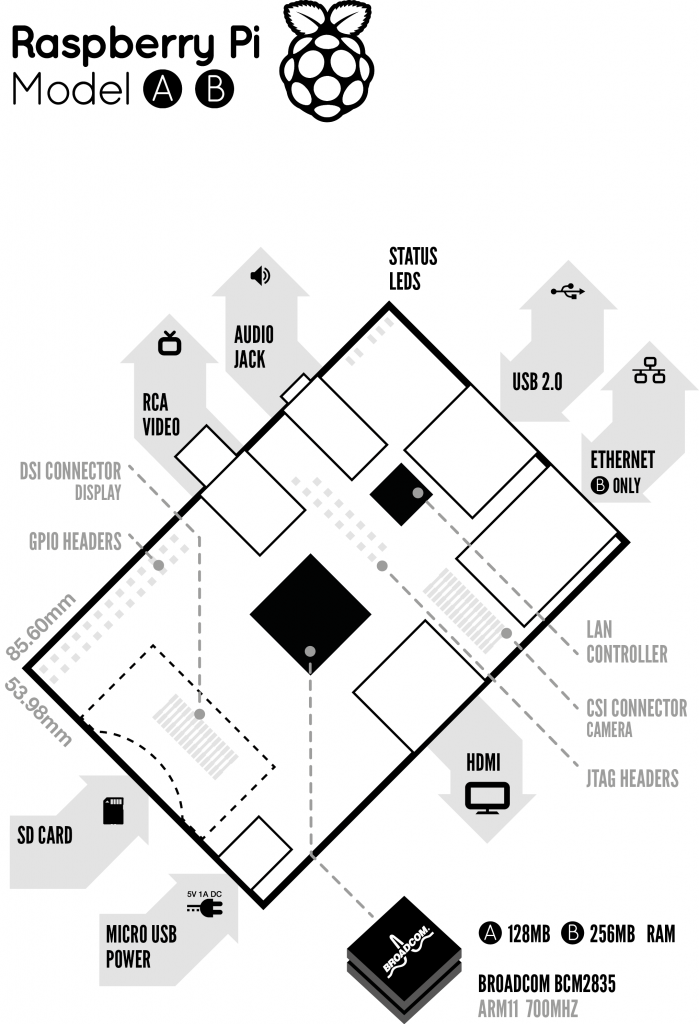
Que usos le daríamos a un bichito de estos? Pues veamos
Navegación en internet: al tener red ethernet, y si corre Fedora Linux, podemos instalar chrome, y webear un rato, todo esto conectado a nuestra tele LCD usando el conector de video HDMI que viene soldado, en resumen, conviertes a tu tele LCD en un smart-tv sin liquidar el cupo de tu tarjeta de crédito
Computador de escritorio: En estos agitados días de la computación, donde nuestro teléfono celular es más potente que la pc que usamos para Word y Excel, el raspberry podría tranquilamente ser utilizado como herramienta de procesamiento de textos y hoja electrónica, ya sea usando algunos de los programas GNU disponibles, o las herramientas de google en línea.
Video Streaming: Cada día se vuelven más comunes los discos NAS (o discos duros de red), desde donde podríamos leer nuestras películas o videos favoritos, y reproducirlos en nuestra LCD, y si cumplen las especificaciones, hasta video HD podríamos reproducir, sin desperdiciar energía, ya que este computador, funciona con 4 baterías AA.
Electrónica Geek: Imagina este escenario. La alarma de nuestra casa, con todos sus sensores, y un par de webcams, conectadas a un servidor web que nos mantiene al tanto 24/7 de la información de los mismos. Que mayor tranquilidad que la de tomar nuestro buen smartphone, digitar la url de nuestra casa, y ver que todo está tranquilo mientras estamos fuera. Por $25 lo podemos hacer!!, simplemente conectamos todo al raspberry (usando el buen netduino, que revisaremos próximamente), y al ejecutar Linux, podemos usar apache, y montar nuestro propio servidor web, que consume menos que un reproductor de DVD en modo de stand by.

No se ustedes que piensan, pero yo me apunto a uno. Estos microcomputadores tendrán un gran futuro en nuestra electrónica casera, ya que son baratos y altamente hackeables; se pueden adaptar a nuestras necesidades más descabelladas.
Por si les queda alguna duda, les dejo este videito, del cásico Quake III, corriendo en una de estas placas.
[HTML1]
Un pequeño video, que dejará mas preguntas que respuestas, empezando por el clásico «como mi#%$a lo hizo!!». Desafiando toda la ley de ohm, les dejo el video de un simple circuito serie, de 3 leds, y 3 interruptores.
[HTML1]
Valga la oportunidad para desearles un muy feliz 2012, y que esté lleno de éxitos para todos!!